

Cash Drawer Movements (Cash In / Cash Out)
Not every cash movement is a sale. You might add ₱2,000 from the safe to give change (a Cash In), pay a delivery rider ₱350 out of the till (a Cash Out), or send the day's surplus to the back office before close (a Cash Out). If you do not log these, your end-of-day variance is wrong and the drawer looks short or over for reasons no one can explain.
Before you start
- A session is open.
- The Register Sessions · Modify permission.
Steps
Open the Drawer sheet
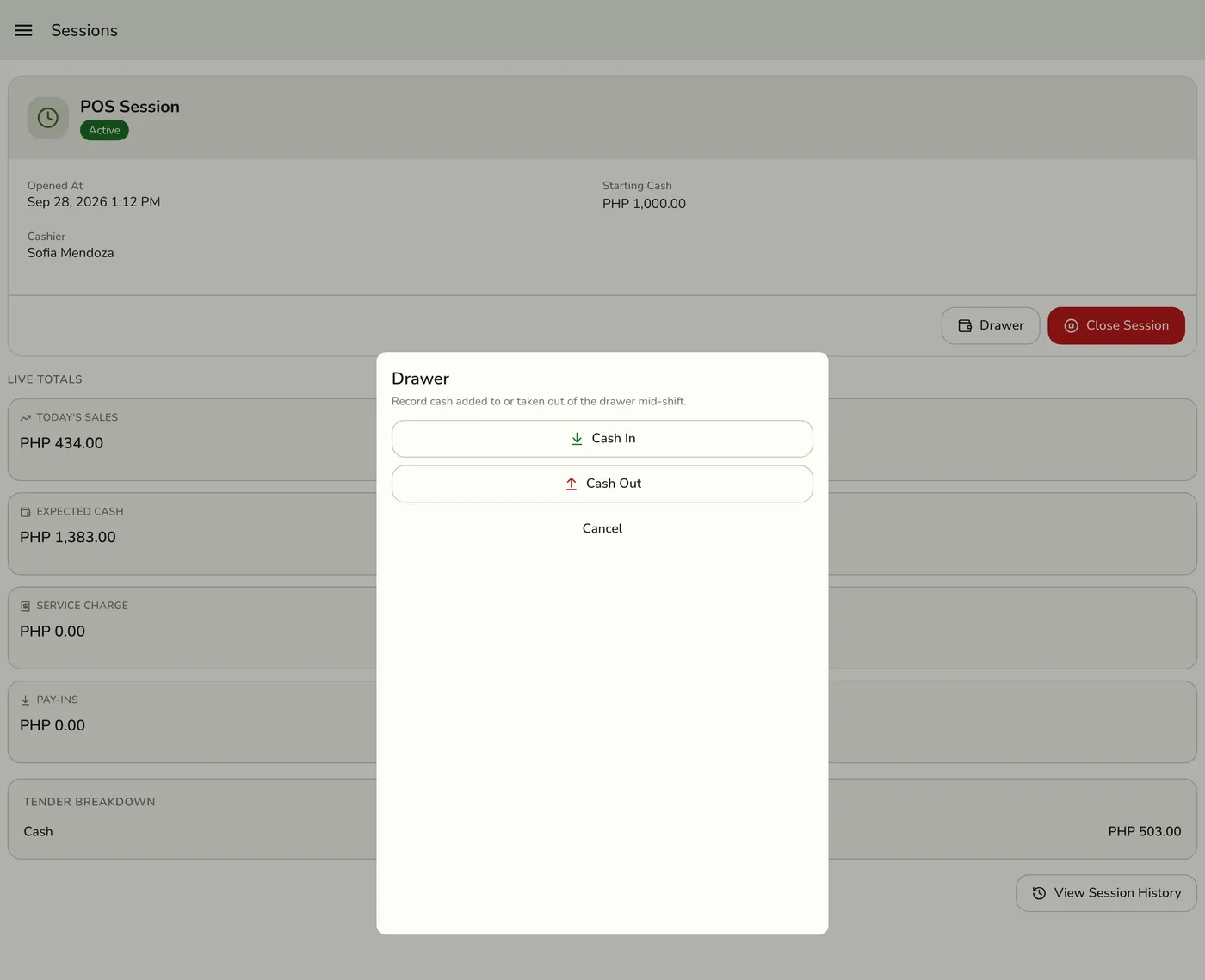
Sidebar, then Session, then Drawer. The Drawer button shows only while a session is open, to staff who may manage sessions.

Pick Cash In or Cash Out
Tap Cash In to add money to the drawer, or Cash Out to take it out. Both open a form.

Enter the amount and a reason
The amount must be above zero. Use a positive number: the direction is carried by In or Out, not the sign. The reason is required, up to 255 characters. Make it short, clear, and factual: "Change top-up from safe", "Lalamove rider, order 12453". On a store with the Expenses add-on, Cash Out says it will be recorded as an expense.
The Record Cash Out dialog, showing the notice that cash payouts are recorded as Expenses while the Expenses add-on is active, with Amount and Reason fields — screenshot coming soon
Save, then hand over the cash
Tap Save. Log the movement the moment cash moves, not an hour later. If a Cash Out is more than the drawer should hold, Fuze asks first, because it would take expected cash below zero. Check the amount, then tap Record anyway if it is right.
What happens next
- The movement is tied to the open session, expected cash updates at once on this device, and it appears on the end-of-day Z-report.
- Expected cash is
opening cash + cash sales − cash out + cash in. If you logged everything, the variance should be tiny. - The Z-report shows Total Cash In, Total Cash Out, and each movement with its reason and amount.
- Other devices on the store are told, but nothing in the app listens, so they show the new totals on their next once-a-minute read.
Edge cases
- Two paths for Cash Out. With the Expenses add-on, the server saves your Cash Out as an approved Cash expense dated today and tied to the open session, with you as the approver and your reason as its description. You do not need expense permissions, and it shows on the Expenses screen. Without Expenses it is a plain drawer movement. Either way the session counts it as cash out, and it lowers expected cash.
- Cash In is always a drawer movement, even with Expenses, because Expenses captures outflows only.
- Expenses from the Expenses screen count against the drawer only when Paid from is Cash drawer (the default). Set it to Other when you paid by bank, e-wallet, or card, so the drawer count is not lowered for cash that never left it.
- No open session. Saving is refused because no session is open. A retried tap is recorded once.
- A close cannot land in the middle. The open session is read fresh and locked while the movement saves.
- Seeing and removing lines. The open shift lists its Cash In and Cash Out lines, newest first, each with amount, reason and who recorded it. Someone with Remove drawer lines (the Register Sessions card in the role editor) can tap Remove on a line entered by mistake and give a reason of 3 to 255 characters. The line stays in the list, struck through, with Removed by [name]: [reason], and no longer counts toward expected cash, the session summary or the Daily Sheet. It also shows in the session's history detail and goes on the staff activity log. A cash out that belongs to a cash advance has no Remove; delete the cash advance instead.
- Do not use Cash Out for refunds. Refunds come off the cash totals through the transaction record. Logging one as a Cash Out would count it twice.
- Only staff with the Sessions permission can record movements, and that is all they need. Removing a line is a separate permission, Remove drawer lines; keep it for the people who approve and run the register. It is your audit trail.
Works with
| Add-on or plan | What changes on this page |
|---|---|
| Store Sessions add-on | Required. Drawer movements belong to an open session. |
| Expenses add-on | Cash Out becomes an approved cash expense tied to the session. See Expenses Overview. |
| Any plan | No plan limit applies. |