

Cash Variance Thresholds
A cash variance is the gap between what your drawer should hold and what is actually there at close. It is a normal part of running a store. What matters is how big it is, whether it is growing, and what your store does about it. Thresholds let you set that policy so the response is automatic.
Before you start
- The Store Sessions add-on is active.
- The Preferences · Modify permission.
Steps
Open Preferences
Sign in as the store owner, an organization owner or admin, or staff whose role has Change control settings. Without that permission the thresholds show read-only with a lock note. Sidebar, then Configurations, then Preferences, then the Policies tab.
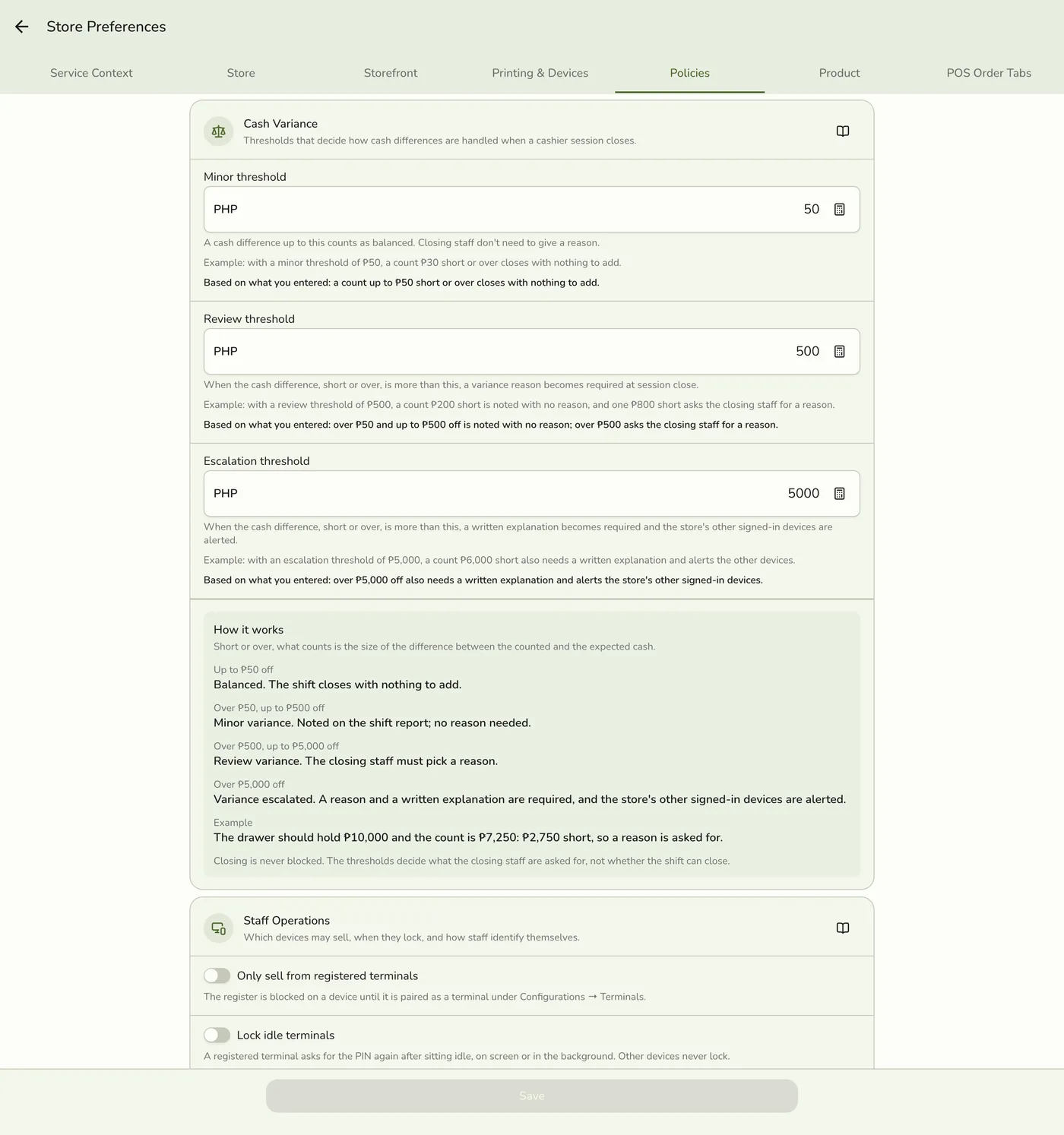
Find the Cash Variance section
Scroll to the Cash variance card. It appears only with the Store Sessions add-on.

Set the three values
Enter your Minor, Review, and Escalation thresholds in your store's currency. They must rise in that order. Tap the calculator on a field to use a numpad. Under each field a line, worked out from what you typed, says what that threshold does, and the How it works card at the bottom lays out the four bands with a worked close.
The three threshold fields filled in — screenshot coming soon
Save
Tap Save. New thresholds apply to the next session close.
The Policies tab after saving — screenshot coming soon
What happens next
- The close screen rates the variance against your numbers: balanced, minor, review, or escalate.
- The reason and explanation are saved with the closed session and show on the Z-report.
Edge cases
- What each threshold does. Minor (default ₱50): below it no warning shows. Review (default ₱500): an orange banner, and the cashier must pick a variance reason before closing. Escalation (default ₱5,000): a red banner, a reason and a free-text explanation are required, and the store's other signed-in devices show a warning on plans with live sync. No email is sent.
- Thresholds are soft. Closing is never blocked. They drive the banner, the prompts, and the warning.
- They must rise in order. Minor must be below Review, and Review below Escalation, or the save is refused.
- The server checks again at close. If someone took a payment while you counted, the difference can grow past a threshold. The close is then refused with the session still open: add the reason or explanation and close again.
- Session History can disagree. The history page rates a closed session against the default bands (50, 500, and 5,000), not your thresholds, so its badge can differ from the one shown at close.
- Choosing your numbers. There is no universal answer. A starting point: Minor about 0.1 to 0.2 percent of a typical day's cash sales, Review about 1 percent, Escalation about 5 percent or one large-bill loss. Tighten over time. If you routinely cross Review from honest miscounts, raise it for a while and invest in counting training.
- Variance reasons the cashier picks from: Wrong change given, Counterfeit bill, Drawer skim, Miscount, Bank deposit, Other (needs an explanation).
- Do not react to one bad shift. A ₱600 variance once a month is noise. A ₱200 variance every weekend on the same staff is a pattern. Pair it with the Staff Performance Report.
Works with
| Add-on or plan | What changes on this page |
|---|---|
| Store Sessions add-on | The Cash variance section appears only with it. |
| Staff Operations add-on | Approval policy and terminal rules sit on the same Policies tab but are separate. |
| Any plan | Thresholds work on every plan. |