

Repair & Technical Services POS
POS for Repair & Technical Service Shops
Log the unit and the serial at intake, put the job on hold while the part arrives, bill parts and labor on one receipt, and text the customer when it is fixed. Built for phone and computer repair, appliance and aircon service, motorcycle shops, and every technician with a queue.

Built for businesses like yours
What kind of business do you run?
Pick your operating model to see how the day flows, where it breaks, and how Fuze Store fits.
Cellphone Repair
Screens, batteries and charging ports — a bench of small jobs, each tied to an IMEI, most done the same day.
Who walks in
Walk-ins with a cracked screen. Hand over the phone → the issue and IMEI are recorded → a quote and a deposit → the repair → a text → collect and pay the balance.
Where it breaks
- A phone left at the counter with no ticket is a dispute waiting to happen
- Screens and batteries run out at the worst time
- "Tapos na ba?" calls interrupt the bench all day
- Parts and labor are quoted differently by whoever is at the counter
What Fuze does for you
- Device, IMEI and reported issue on every job
- Parts and labor on one order
- Parts stock and low-stock alertsAdd-on
- Order-status QR on the receipt
- "Your phone is ready" textAdd-on
A typical order
- Record the device, IMEI and issue
- Quote; take a deposit
- Repair; the part comes off the count
- Mark ready; text the customer
- Collect the balance; release the unit
What changes
Every phone on the bench has a ticket with its IMEI, the customer checks status from the receipt instead of calling, and parts are reordered from a count.
Computer & Laptop Repair
Longer jobs — diagnostics, reformat, board work — often waiting days for a part, with the unit in the shop the whole time.
Who walks in
Students and small offices. Drop off the laptop → diagnosis → a quote → approve → wait for the part → the repair → collect.
Where it breaks
- A laptop waiting on a part sits in a pile with no status
- Diagnosis and repair are two visits with two pieces of paper
- The customer approved a quote in a chat that is now buried
- Units on the shelf and their owners are matched from memory
What Fuze does for you
- On-hold status while waiting on parts
- Serial number searchable across jobs
- Order note for the diagnosis and the approved quote
- Deposit now, balance at release
- Status text when the part arrivesAdd-on
A typical order
- Log the unit and the serial
- Diagnose; note the quote; take a deposit
- Put the job on hold for the part
- Repair; mark ready; text
- Collect the balance; release
What changes
A job waiting on a part is a status, not a pile, and the quote the customer approved is on the order.
Appliance & Aircon Service
Cleaning and repair at the customer’s house — booked by message, done by a technician on a schedule, paid on site.
Who walks in
Households and small offices booking a cleaning or a repair. Message → book a date → the technician visits → the job → pay on site.
Where it breaks
- Bookings are a chat history and a whiteboard
- Technicians carry cash from several jobs
- Which house, which unit, which technician — on a slip
- Parts used on site are never counted
What Fuze does for you
- Appointments per technician with an address
- Reminder and "on the way" textsAdd-on
- Cash per technician on the report
- Parts used on the orderAdd-on
- Customer history per unit
A typical order
- Book the visit with the address and the unit
- Assign the technician
- Reminder text the day before
- The job; parts recorded
- Pay on site; recorded to the technician
What changes
Every visit is a booking with a technician and an address, cash reconciles per technician, and the customer’s unit history is a search away.
Motorcycle Repair Shop
Change oil, tune-ups, tyres and the occasional rebuild — riders who need it today and come back every few months.
Who walks in
Riders and tricycle operators. Ride in → describe the problem → parts and labor quoted → the work → pay → ride out.
Where it breaks
- Parts by the thousand with no way to find what is in stock
- Labor is charged from memory, differently each time
- The same plate comes back and nobody remembers the last job
- Walk-ins pile up with no queue
What Fuze does for you
- Plate number and reported issue on the job
- Parts and labor priced once, on one order
- Parts stock and purchase ordersAdd-on
- Waiting list for the Saturday queueAdd-on
- History by plate
A typical order
- Log the bike and the issue
- Add parts and labor
- The work; parts off the count
- Pay; receipt itemised
- The plate’s history updates
What changes
The right part is found in seconds, labor is priced once, and the rider’s last job is a plate number away.
Locksmith & Small Trades
Key duplication, lock changes, welding, watch and shoe repair — quick counter jobs and the occasional call-out.
Who walks in
Walk-ups with a key to copy or a strap to fix. Walk up → the job → pay cash → go, or book a call-out.
Where it breaks
- Dozens of small cash jobs a day with no total
- Call-outs are booked on a whiteboard
- Blanks and consumables run out on a guess
- No record of what was done for whom
What Fuze does for you
- Services priced once, rung up in a tap
- Runs on a phone at the counter
- Call-outs as appointments with an address
- Consumables stockAdd-on
- Shift cash countAdd-on
A typical order
- Customer asks for the job
- Tap the service
- Customer pays
- The sale is recorded
- Close the day against the expected cash
What changes
Every small job is counted, call-outs are bookings, and the day closes against a number.
Also a fit for
- Cellphone repair
- Computer / laptop repair
- Electronics repair
- Appliance repair
- Watch repair
- Shoe & bag repair
- Furniture repair
- Bicycle repair
- Motorcycle repair
- Vulcanizing shop
- Auto electrical service
- Small mechanic shop
- Aircon cleaning / repair
- Locksmith
- Welding service
- Key duplication
Sound familiar?
The problems you actually deal with
Jobs get lost or mixed up
Paper claim stubs and mental notes lead to lost units and confused customers.
What it costs: A unit you cannot account for
Customers keep following up
"Tapos na ba?" calls interrupt work all day because there is no status the customer can see.
What it costs: A bench that never gets a clear hour
No visibility on parts
You run out of common parts at the worst time because nothing tracks the stock.
What it costs: Jobs stuck waiting on a part you had last week
Waiting on parts, invisibly
A job waiting for a part looks the same as a job nobody has started.
What it costs: Units forgotten on the shelf
Parts and labor quoted from memory
Two technicians, two prices for the same screen replacement.
What it costs: Undercharging and arguments
Deposits in a notebook
A deposit at intake, the rest at release, and no record of which is which.
What it costs: Balances never collected

A day in the shop
From opening to closing
Morning8:00 AM
Opening the bench
Without a system
Sort the units on the shelf by memory, check which parts arrived, and count the float.
With Fuze Store
The job queue shows what is on hold, what is in progress and what is ready; the parts that arrived move jobs off hold.
Peak hours10 AM – 2 PM
Intake and the phone calls
Without a system
Units come in on paper stubs while the phone rings with "tapos na ba?".
With Fuze Store
Every intake is a job with the serial and the issue; customers check status from the receipt QR instead of calling.
End of day6:00 PM
Closing
Without a system
Count the drawer, count the deposits, and try to remember which units are due tomorrow.
With Fuze Store
Close the session against the expected total and read tomorrow’s ready-by dates and the parts to reorder.
How it works
One order, start to finish
- 1
Intake
Record the device, the serial or IMEI, and the reported issue — the fields the Repair template sets up. Take a deposit if there is one.
- 2
Print the claim receipt
The receipt carries the order number and a QR the customer can scan to see the job’s status.

- 3
Repair, or hold for parts
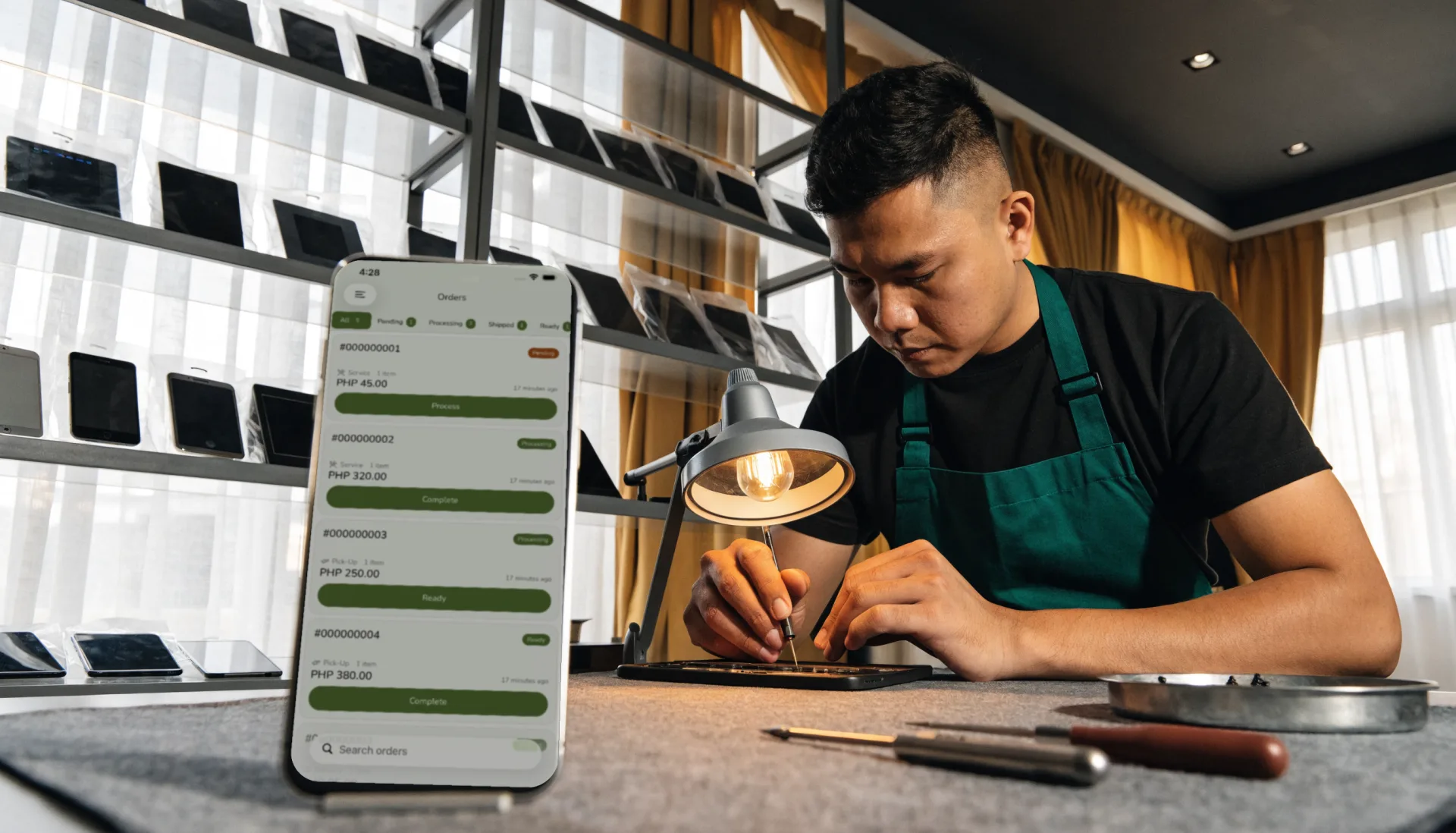
Move the job to Processing, or On hold while a part is ordered. Everyone on the bench sees the queue.
- 4
Ready — text the customer
One tap sends "your unit is ready", with the balance due if there is one.
- 5
Release and collect
Parts and labor on one receipt. Cash, your own e-wallet QR, or your own terminal. Fuze records it.
- 6
Read the week
Jobs completed, parts used, and the technician who did them, on your phone.
The Fuze moment
One sale. Everything connected.
A cracked screen, IMEI recorded, ₱500 deposit, part on order. One intake — and six things update from it.
A stub records that a phone came in. The POS connects it to the serial, the part, the status the customer can see, and the balance you will actually collect.
Built for the way you work
The features that matter here
Job intake fields
The Repair template adds Device, a searchable Serial / IMEI, and Reported issue to every order, so a unit is never just a name on a stub.
- Searchable serial
- Issue on the ticket
- History per unit
Job queue with On Hold
Pending, Processing, On hold for parts, Ready, Completed — the tabs a repair job actually moves through.
Status the customer can check
The receipt carries an order QR; scanning it shows the job’s status, so "tapos na ba?" becomes a glance at a phone.
Deposits and balances
A deposit at intake, the balance at release — on the order and the receipt.
Technician on the job
Assign each job to a technician; the report shows jobs and sales per technician.
Before and after
What changes when it is all in one place
| Task | Before Fuze | With Fuze Store |
|---|---|---|
| Intake | Before FuzeA paper stub | With Fuze StoreA job with the serial and the issue |
| Waiting on parts | Before FuzeA unit in a pile | With Fuze StoreAn On-hold status |
| "Tapos na ba?" | Before FuzeA phone call | With Fuze StoreA QR on the receipt |
| Parts | Before FuzeRun out at the worst time | With Fuze StoreA low-stock alert |
| Parts and labor | Before FuzeQuoted from memory | With Fuze StorePriced once, on one receipt |
| Deposits | Before FuzeA notebook | With Fuze StoreA balance on the order |
The owner’s view
Finally see what is happening in your business
FixIt Gadget Repair — Demo Shop
Illustrative dataThis week's sales
₱48,300
parts ₱22,100 · labor ₱26,200
Jobs completed
63
7 on hold for parts
Average job
₱767
parts and labor
Parts low on stock
4
reorder list ready
Jobs per technician this week
- Ryan27
- Paolo22
- Miko14
What changes
Seven jobs are on hold for the same screen model — one purchase order clears the shelf and a week of "tapos na ba?" texts.
Numbers shown are demo data for illustration, not a real store.
Start small, grow
Fuze grows with the business
- 1
Start simple
One bench, one phone, your services and common parts priced, and every unit logged with its serial.
- Job intake with serial and issue
- Parts and labor on one order
- Deposits and balances
- Claim receipts with a status QR
- 2
Get organised
Parts that count themselves, texts that go out on their own, and a drawer that reconciles.
- Parts stock and purchase orders
- Ready texts
- Cashier sessions
- Waiting list for walk-ins
- 3
Grow
A second branch, technicians with roles, and reports that compare them.
- Multiple branches under one organization
- Roles and manager approvals
- Reports across branches
Setup
What Fuze Sets Up For You
Pick Repair Shop when you create your store.
Pick one of the 5 business models above during setup and Fuze presets the rest.
Frequently Asked Questions
Every unit logged, every job on a status the customer can see.
Fuze Store is free during Early Release — no credit card required.

More industries